RAZER QA CO-AI
Streamline game testing with Razer QA Co-AI: effortless bug detection, detailed reports, seamless integration.
Try Razer QA Co-AIAutomate and streamline QA with an AI companion

Direct Bug Sync to JIRA

Performance Regression Tracking

AI-Driven Gameplay Bug Analysis
Available via WYVRN SDK
Boost your QA efficiency with Razer QA Co-AI — a cloud-based tool that automates bug detection and performance tracking during playtests. It takes care of the repetitive work for QA testers, automatically logging crashes and performance issues in real time, and generating clear reports with screenshots, video clips, and event data. Compatible with Unreal Engine, Unity and custom C++ engines.
* Up to 25% More Bugs Identified, 50% Faster Testing Cycles, 40% Reduced QA Costs:AI in QA / State of Gaming QA
Core features
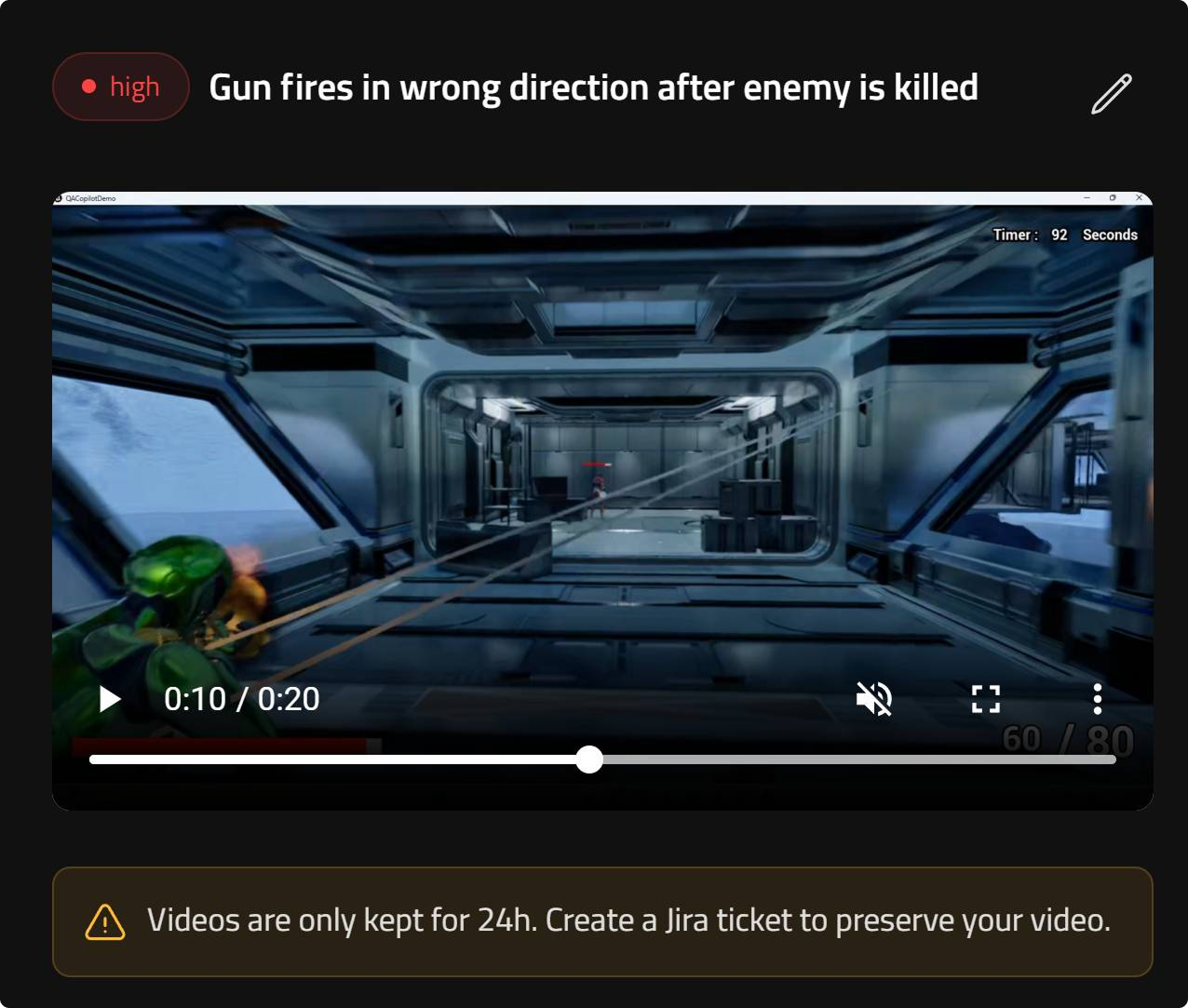
Record gameplay issues in one click
Razer QA Co-AI optimizes QA testing for games by making bug reporting fast, visual, and reliable. With a single click, QA testers can capture a 20-second gameplay video leading up to an issue, giving developers immediate visual context to understand, reproduce, and fix bugs more efficiently.
- Instant video capture: One-click bug recording of the moments before an issue occurs during gameplay.
- Annotated screenshots: Visual notes added directly to captured images to highlight problem areas for developers.
- Hotkeys: Ctrl + B captures a screenshot, and Ctrl + Shift + B records the last 20 seconds of gameplay, allowing precise capture of bugs.
- Optimized format: Videos are encoded in .MP4 (1080p, 3 Mbit/s) for high-quality playback without affecting in-game performance.
- Secure cloud storage: Captures are automatically uploaded, stored for 24 hours, and then securely deleted.
- Faster debugging workflow: Real-time video context improves QA efficiency, reduces tester–developer handoff time, and accelerates issue reproduction.
Explore setup guides, integration steps and detailed configuration for QA Co-AI.
DocumentationHow it works with game and QA studios
ONBOARDING TUTORIAL
This tutorial guides you through the initial setup of Razer QA Companion, including installing the Razer AI Service, configuring your first project, and connecting to Jira for seamless bug tracking. You’ll learn how to define performance thresholds, launch QA sessions, and capture gameplay issues with video-backed reports, all designed to help streamline your QA workflow from the very first session.
Start testing with QA Companion
Experience a faster, smarter way to test and ship your games. Razer QA Co-AI combines automation, AI-driven insights, and seamless integration to help teams catch issues earlier, improve performance, and deliver more stable builds with less effort.
Try Razer QA Co-AIAI GAME DEVELOPER TOOLS
Try advanced AI QA tools that simplify and accelerate testing, helping you ship more stable builds.
Try QA Co-Ai