Designing Realistic Haptics: The Power of Frequency in Battlefield 6
Vasguen Vardanian · · Effects Design
In this deep dive, we explore how haptic frequency design transforms gameplay in Battlefield 6. From the subtle vibration of a jet engine to the sharp impact of gunfire and the disorienting blast of a flash grenade, frequency becomes a powerful tool for shaping physical sensations in games. Discover how designers use frequency ranges, hardware constraints, and layered effects to create immersive, believable haptic experiences.

Today we’re diving into Battlefield 6 and exploring how frequency can dramatically change the feel of a haptic effect when used with the right design intention.
If terms like haptic effect, design intention, or frequency are still new, we recommend checking out the previous Marvel Rivals article, where we covered the basics of haptic design principles and Chroma effects.
In Marvel, we looked at how a handful of parameters can create strong, expressive impact effects that complement each character’s colorful abilities.
For Battlefield 6, the approach to haptic effects design is different: with the same parameters (amplitude, frequency, transient), the goal is realism — effects that feel subtle, grounded, and physically believable. And the key to achieving this is frequency control. In this article, we’ll look at a few examples and see:
If terms like haptic effect, design intention, or frequency are still new, we recommend checking out the previous Marvel Rivals article, where we covered the basics of haptic design principles and Chroma effects.
In Marvel, we looked at how a handful of parameters can create strong, expressive impact effects that complement each character’s colorful abilities.
For Battlefield 6, the approach to haptic effects design is different: with the same parameters (amplitude, frequency, transient), the goal is realism — effects that feel subtle, grounded, and physically believable. And the key to achieving this is frequency control. In this article, we’ll look at a few examples and see:
- How does frequency shape the feel of a haptic effect?
- How should haptic frequency be adapted to different hardware?
- How to design realistic haptics for vehicles, weapons, and explosions?
- How do different frequency ranges affect immersion?
Before we dive in, it’s best to start with a quick refresher on what frequency actually is. Frequency allows us to control the “pitch” of an effect: the higher the frequency, the higher the pitch; the lower the frequency, the deeper the pitch.
At first glance, this seems simple enough. However, there are certain specifics related to frequency that need to be considered to ensure the design is as effective as possible.
First of all, designing haptics for real games means considering something many forget: each device has its own supported frequency range. For example, at Razer, we have several haptic devices: Razer Frejya, with a frequency range between 25 and 200 Hz; the Razer Wolverine V3 Pro, with a frequency range between 40 and 300 Hz; and finally, the device where managing the frequency range is most critical—the Razer Kraken V4 Pro which has a range between 15 and 65 Hz.
Why is this important? The reason is simple: sound is also a vibration. If your haptic frequency exceeds what the hardware can cleanly reproduce, the player hears the effect — and that’s not always pleasing or desirable.
This is one of many fundamentals every haptic designer needs to factor into their workflow. With that in mind, let’s explore in-game examples, starting with vehicles.
At first glance, this seems simple enough. However, there are certain specifics related to frequency that need to be considered to ensure the design is as effective as possible.
First of all, designing haptics for real games means considering something many forget: each device has its own supported frequency range. For example, at Razer, we have several haptic devices: Razer Frejya, with a frequency range between 25 and 200 Hz; the Razer Wolverine V3 Pro, with a frequency range between 40 and 300 Hz; and finally, the device where managing the frequency range is most critical—the Razer Kraken V4 Pro which has a range between 15 and 65 Hz.
Why is this important? The reason is simple: sound is also a vibration. If your haptic frequency exceeds what the hardware can cleanly reproduce, the player hears the effect — and that’s not always pleasing or desirable.
This is one of many fundamentals every haptic designer needs to factor into their workflow. With that in mind, let’s explore in-game examples, starting with vehicles.
Aircraft Engine Haptics
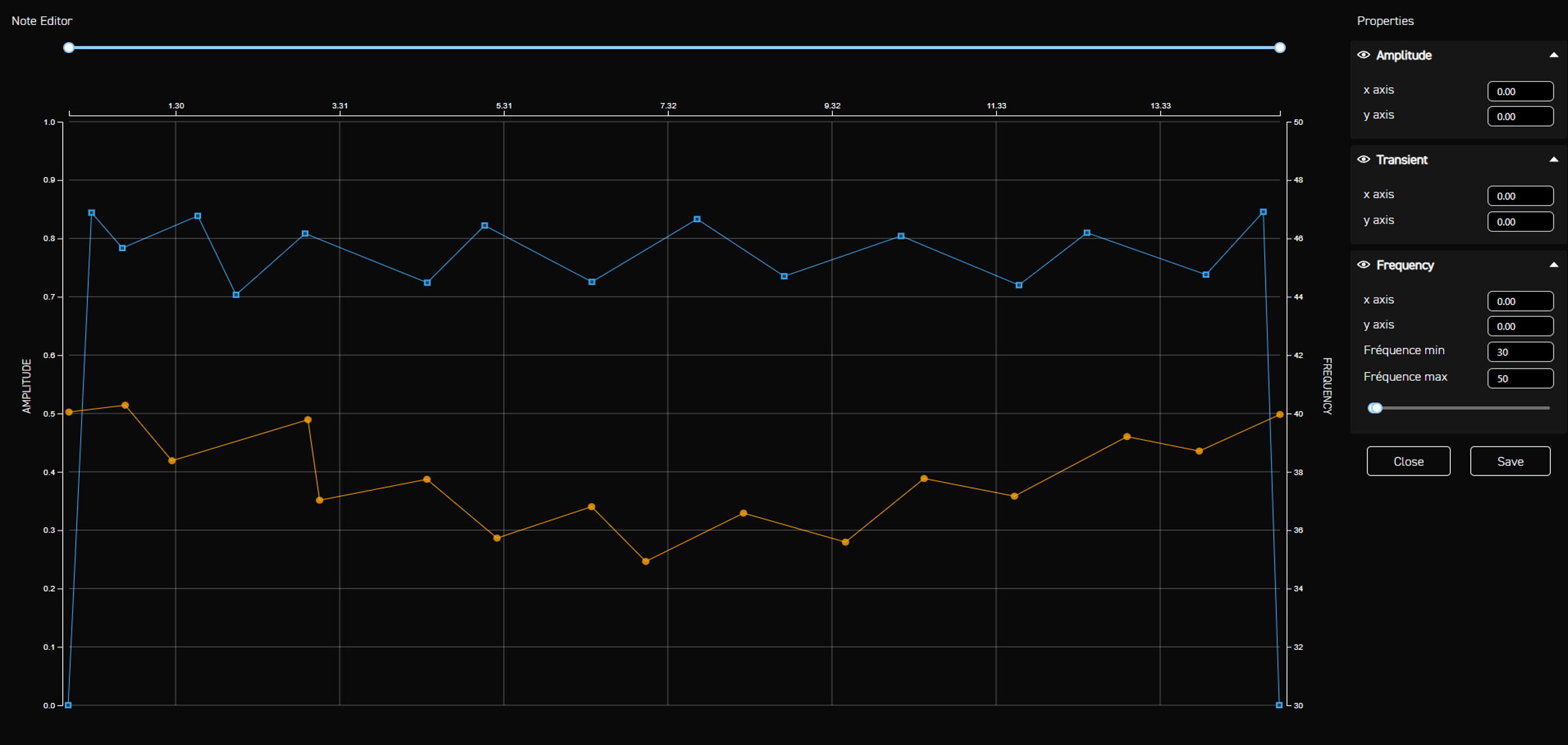
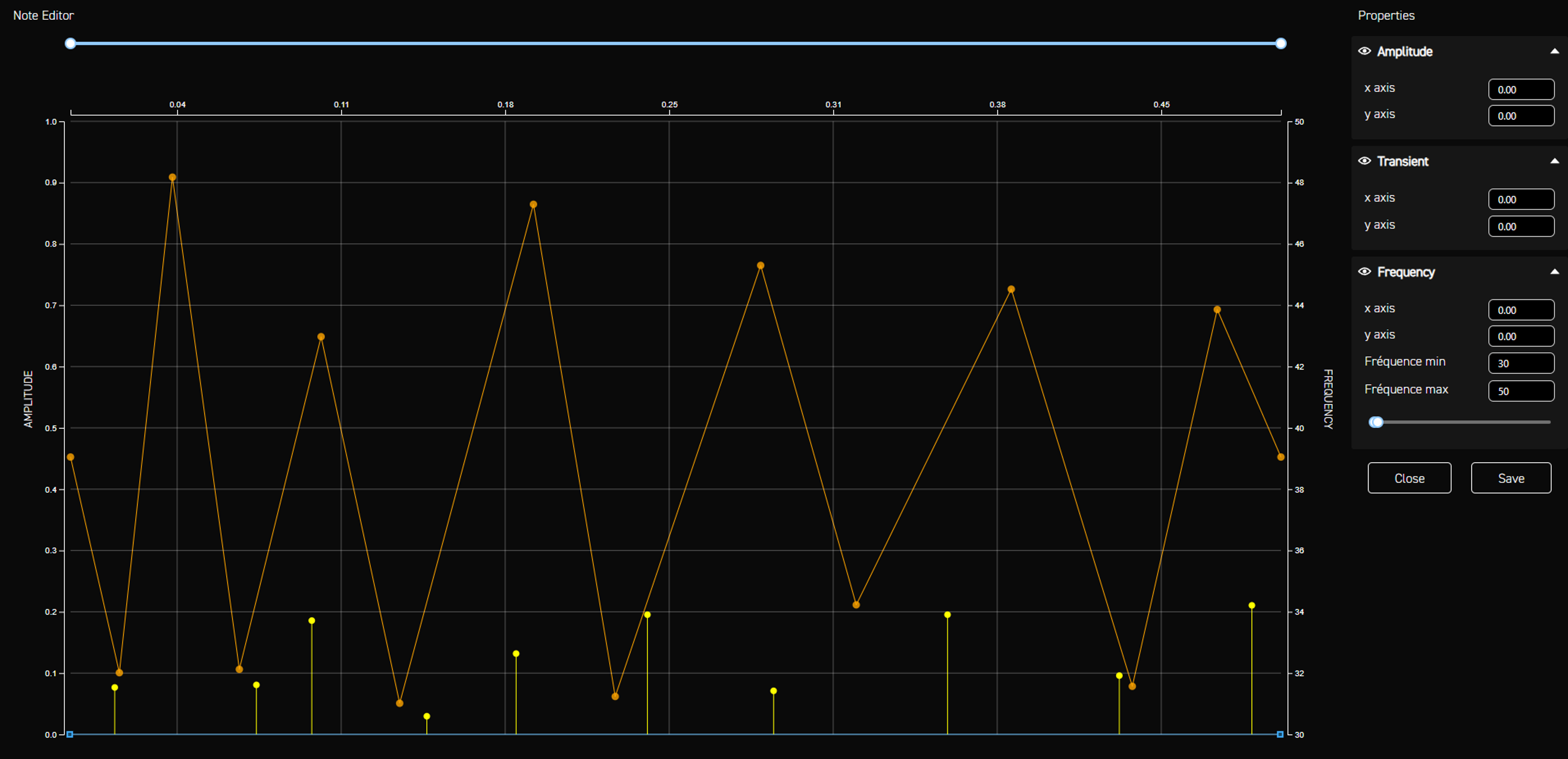
Let’s start with the Planes. The idea here is to simulate the movement of a running engine while also creating the impression of floating through the air. To achieve this, we use amplitude to simulate the engine rumble.
First, the frequency sits in a very low range, between 30 and 50 Hz, which produces a gentle background vibration commonly associated with vehicles — that “present but not overwhelming” feeling.
On top of that, the frequency will have slight variations between each point, creating a barely perceptible change that gives the effect even more depth.
Finally, the overall frequency shape decreases slightly and then rises again. Combined with the game’s animation and sound design, this creates the feeling of being in an airborne vehicle with minimal friction.
In this case, the slight frequency variation gives the effect more realism and makes it feel like a gradual rise-and-fall rumble, simulating the floating sensation.
First, the frequency sits in a very low range, between 30 and 50 Hz, which produces a gentle background vibration commonly associated with vehicles — that “present but not overwhelming” feeling.
On top of that, the frequency will have slight variations between each point, creating a barely perceptible change that gives the effect even more depth.
Finally, the overall frequency shape decreases slightly and then rises again. Combined with the game’s animation and sound design, this creates the feeling of being in an airborne vehicle with minimal friction.
In this case, the slight frequency variation gives the effect more realism and makes it feel like a gradual rise-and-fall rumble, simulating the floating sensation.
Tank Movement Haptics
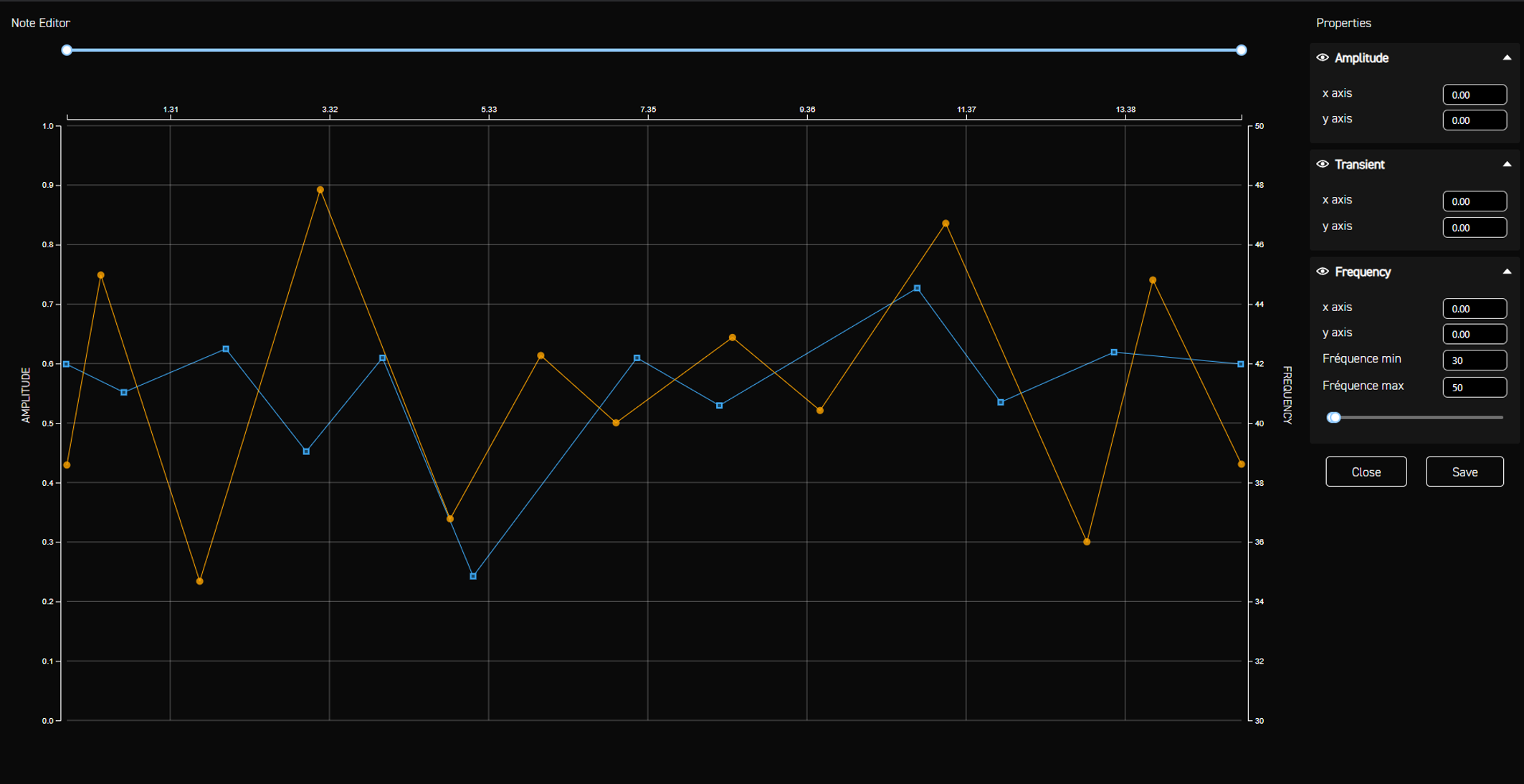
For land vehicles like tanks, the approach is slightly different from aerial vehicles. Tanks are heavy machines that react strongly to terrain, and the haptic effects must convey this. Amplitude variations are much more pronounced, reflecting how the vehicle shakes under its own weight.
And while the frequency follows the same principle as the plane effect, remaining in the range between 30 and 50 Hz, it will also include much more pronounced peaks to simulate the irregular, forceful behavior of a tank engine. Here, the frequency helps reinforce the variation aspect, which is essential to the realism of this effect.
However, this demonstrates only a small part of what can be done with frequency, and for the next effect, we might want to use it in a completely different way. While for vehicles it helped us introduce subtle variations influenced by the environment, frequency can also serve as a clear indicator of power—especially for weapons, where the “feeling” of each shot often depends on how sharp, heavy or aggressive the vibration is.
And while the frequency follows the same principle as the plane effect, remaining in the range between 30 and 50 Hz, it will also include much more pronounced peaks to simulate the irregular, forceful behavior of a tank engine. Here, the frequency helps reinforce the variation aspect, which is essential to the realism of this effect.
However, this demonstrates only a small part of what can be done with frequency, and for the next effect, we might want to use it in a completely different way. While for vehicles it helped us introduce subtle variations influenced by the environment, frequency can also serve as a clear indicator of power—especially for weapons, where the “feeling” of each shot often depends on how sharp, heavy or aggressive the vibration is.
Assault Rifle Haptics
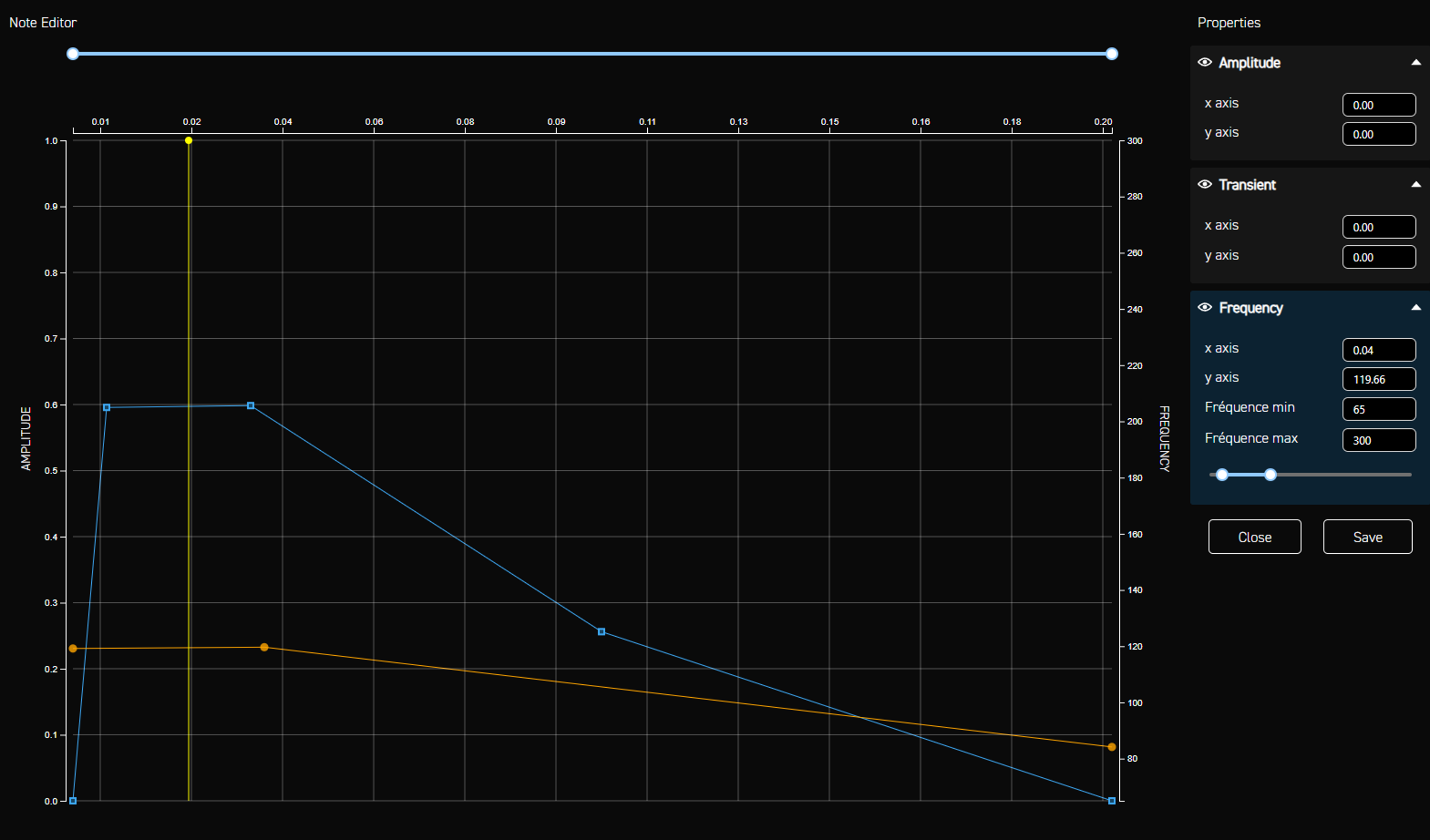
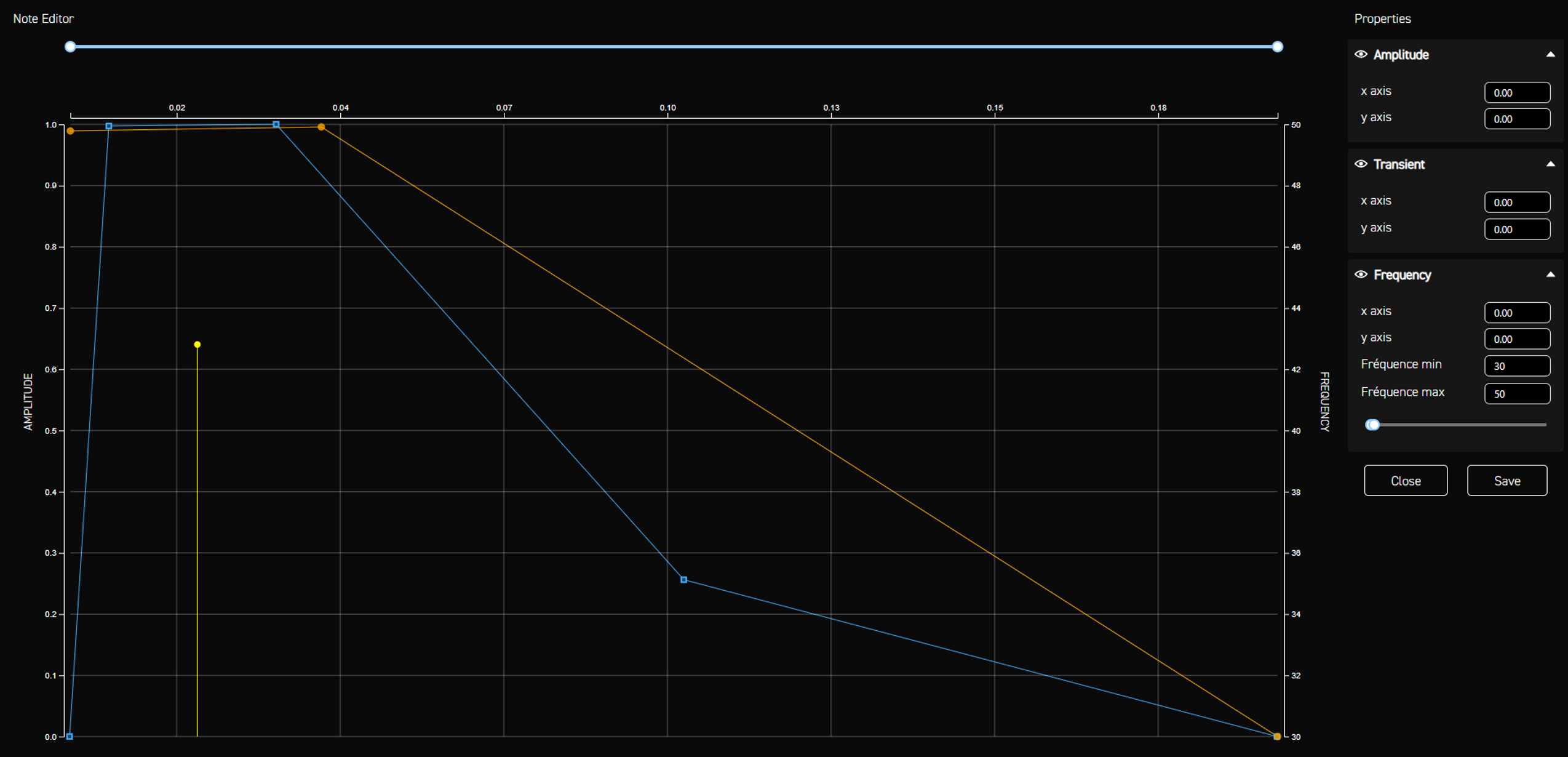
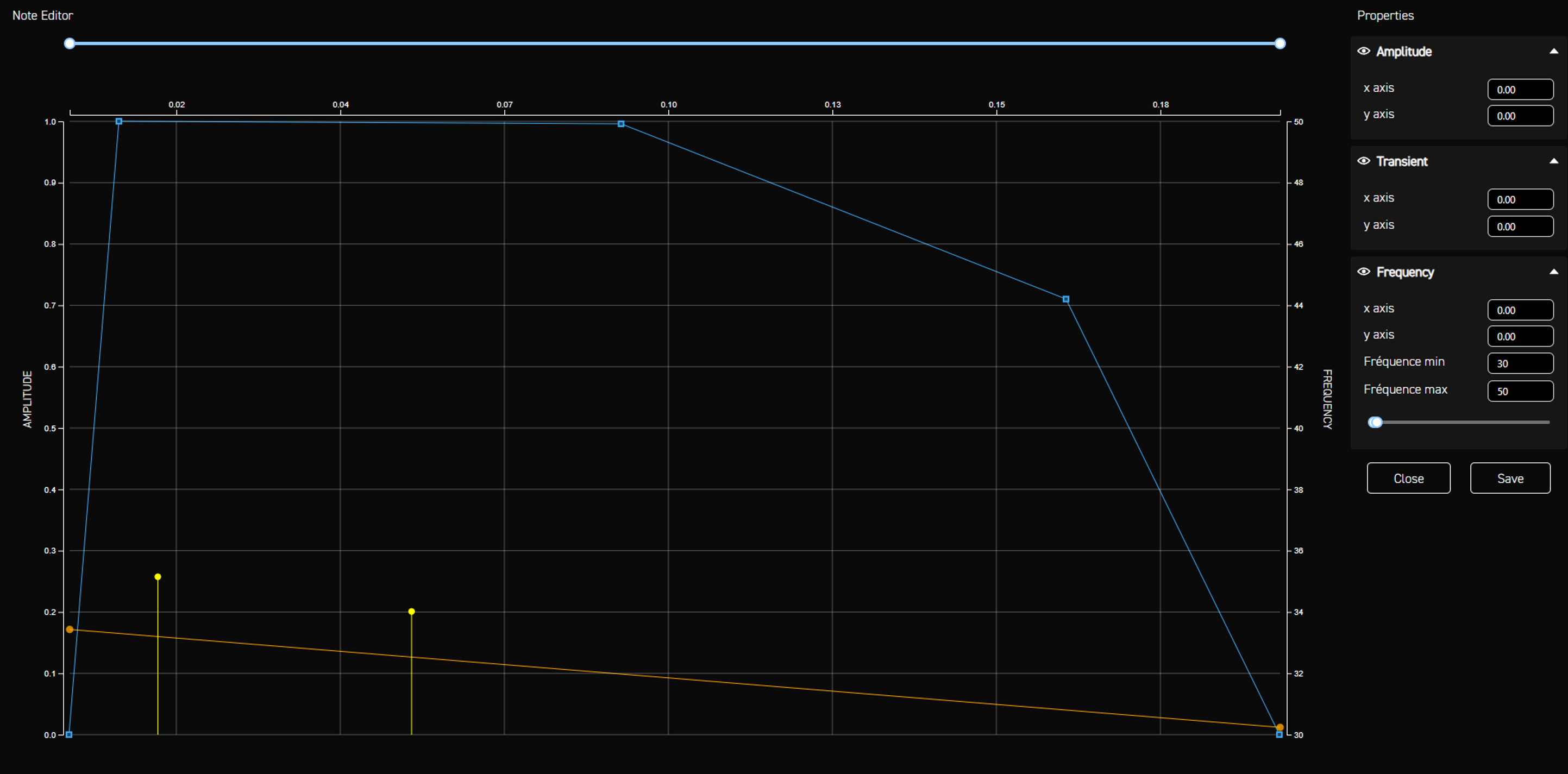
In assault rifle effects, we notice a particular nuance, which tends to be redundant for other effects. Because these effects require higher frequencies to feel sharp and impactful, we design two versions of the same effect. One version can reach up to 200 Hz for the Razer Frejya and Wolverine V3 Pro. The other version stays below 50 Hz for the Kraken V4 Pro, thereby avoiding the risk of hearing the vibration in the headset.
Most weapon effects follow a familiar structure: an initial impact that is more or less strong depending on the weapon, followed by a decreasing amplitude to create an aftershock impression. Of course, the exact timing of the impact and the aftershock will vary depending on the weapon. But as a rule, at the beginning, we have a transient with high amplitude and frequency, then after a short time, both amplitude and frequency decrease —regardless of the frequency range. So why do we aim for effects with higher frequencies? The reason is simple: higher frequencies help make the vibration feel sharper and more aggressive, which aligns perfectly with the behavior of an assault rifle.
However, each weapon has its own identity. While an assault rifle benefits from a relatively high frequency that stays within a moderate range, some weapons need to fall into much lower frequency ranges.
Most weapon effects follow a familiar structure: an initial impact that is more or less strong depending on the weapon, followed by a decreasing amplitude to create an aftershock impression. Of course, the exact timing of the impact and the aftershock will vary depending on the weapon. But as a rule, at the beginning, we have a transient with high amplitude and frequency, then after a short time, both amplitude and frequency decrease —regardless of the frequency range. So why do we aim for effects with higher frequencies? The reason is simple: higher frequencies help make the vibration feel sharper and more aggressive, which aligns perfectly with the behavior of an assault rifle.
However, each weapon has its own identity. While an assault rifle benefits from a relatively high frequency that stays within a moderate range, some weapons need to fall into much lower frequency ranges.
LMG Recoil Haptics
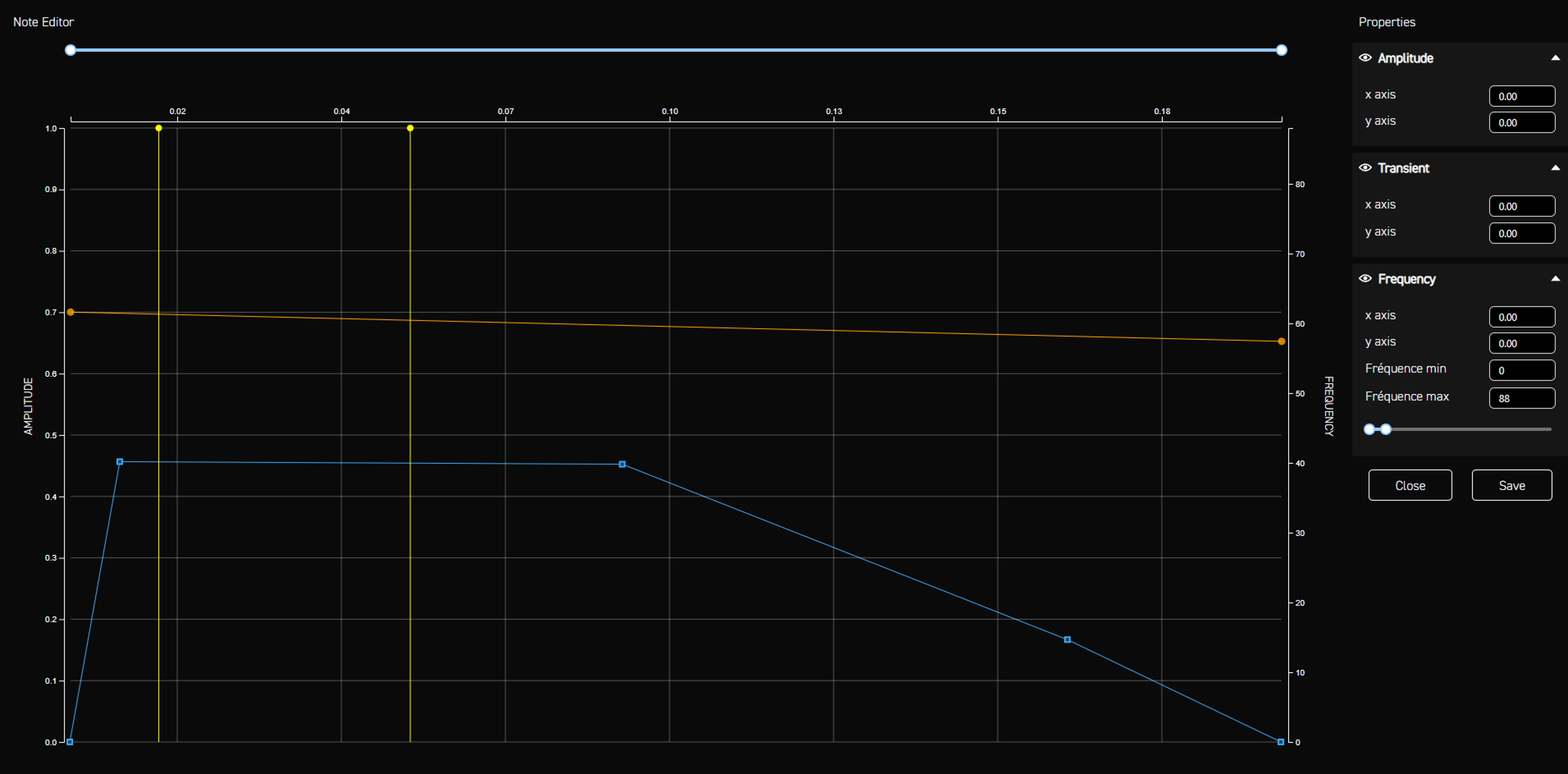
For LMGs, the intention is to create a feeling of heaviness with each bullet. The weapon itself is heavy, and that weight must be felt. For this reason, the initial impact is longer, and the frequency is lower, around 65 Hz. The frequency also doesn’t drop as sharply, which makes each shot feel heavier and more powerful. The principle remains the same as for assault rifles but adapted to represent a much bulkier weapon.
SMG Fire Haptics
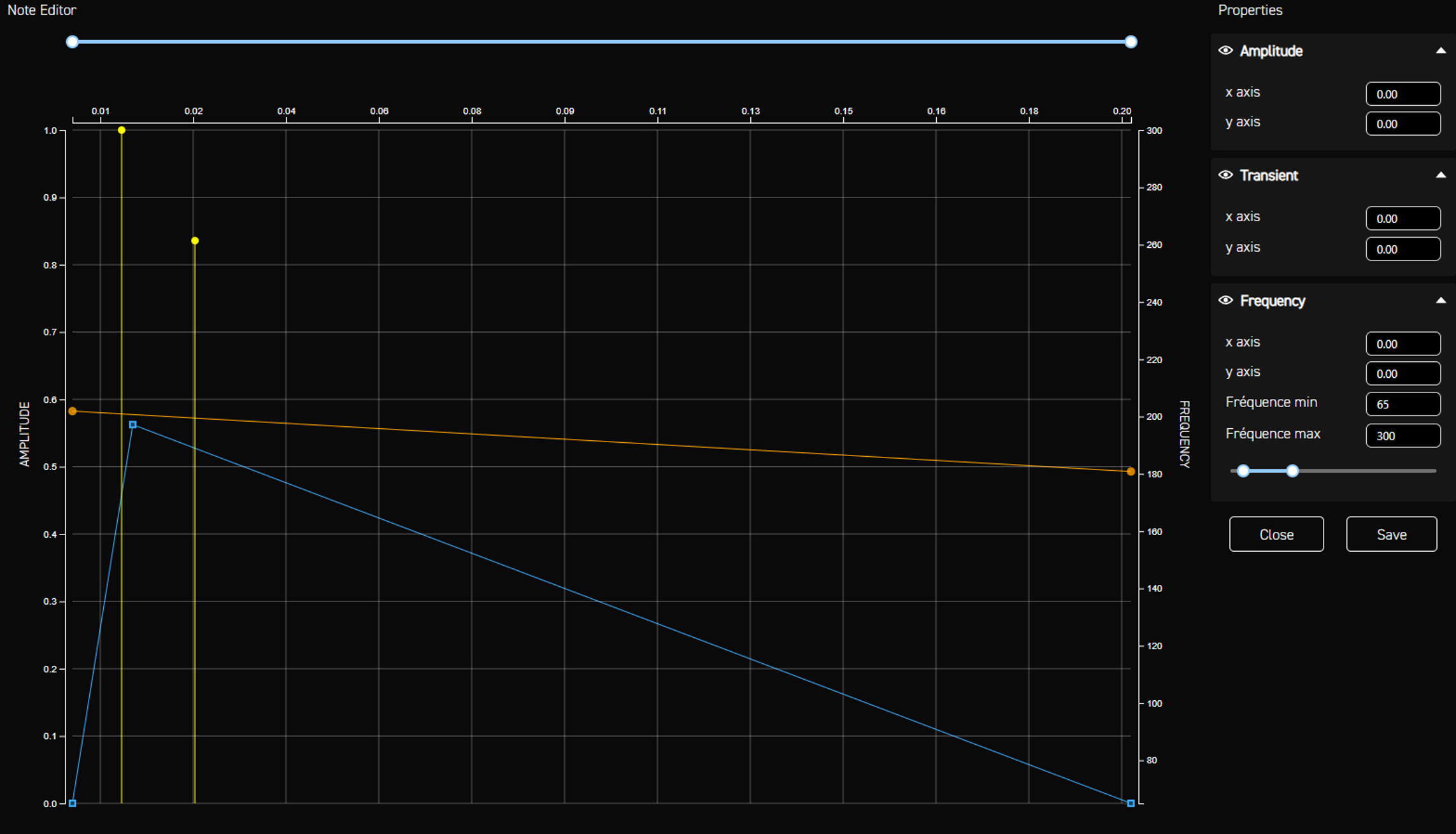
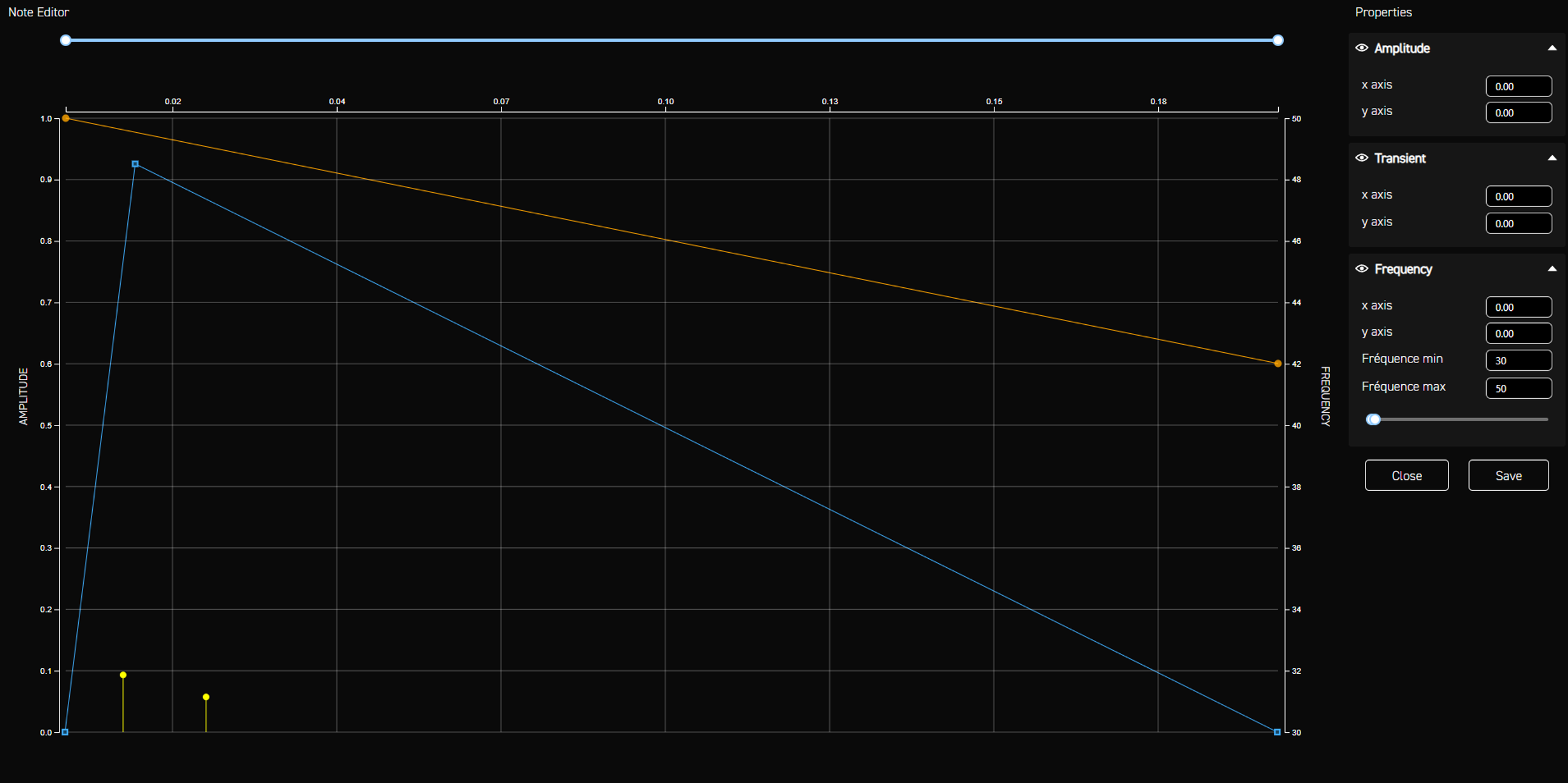
For SMGs, we’re dealing with a very light weapon capable of firing many rounds in rapid succession. The initial impact of each bullet will therefore be faster, and most importantly, the frequency will be much higher—significantly higher than that of an assault rifle.
Here, we push the frequency to the maximum possible to make each shot feel quick and sharp. Even though the principle is the same—transient followed by a decrease—this version feels much more reactive and light.
At this point, we’ve talked about straightforward uses of frequency. But we can go further and play with frequency behaviour to create more dramatic or unusual sensations.
Here, we push the frequency to the maximum possible to make each shot feel quick and sharp. Even though the principle is the same—transient followed by a decrease—this version feels much more reactive and light.
At this point, we’ve talked about straightforward uses of frequency. But we can go further and play with frequency behaviour to create more dramatic or unusual sensations.
Explosion Haptics
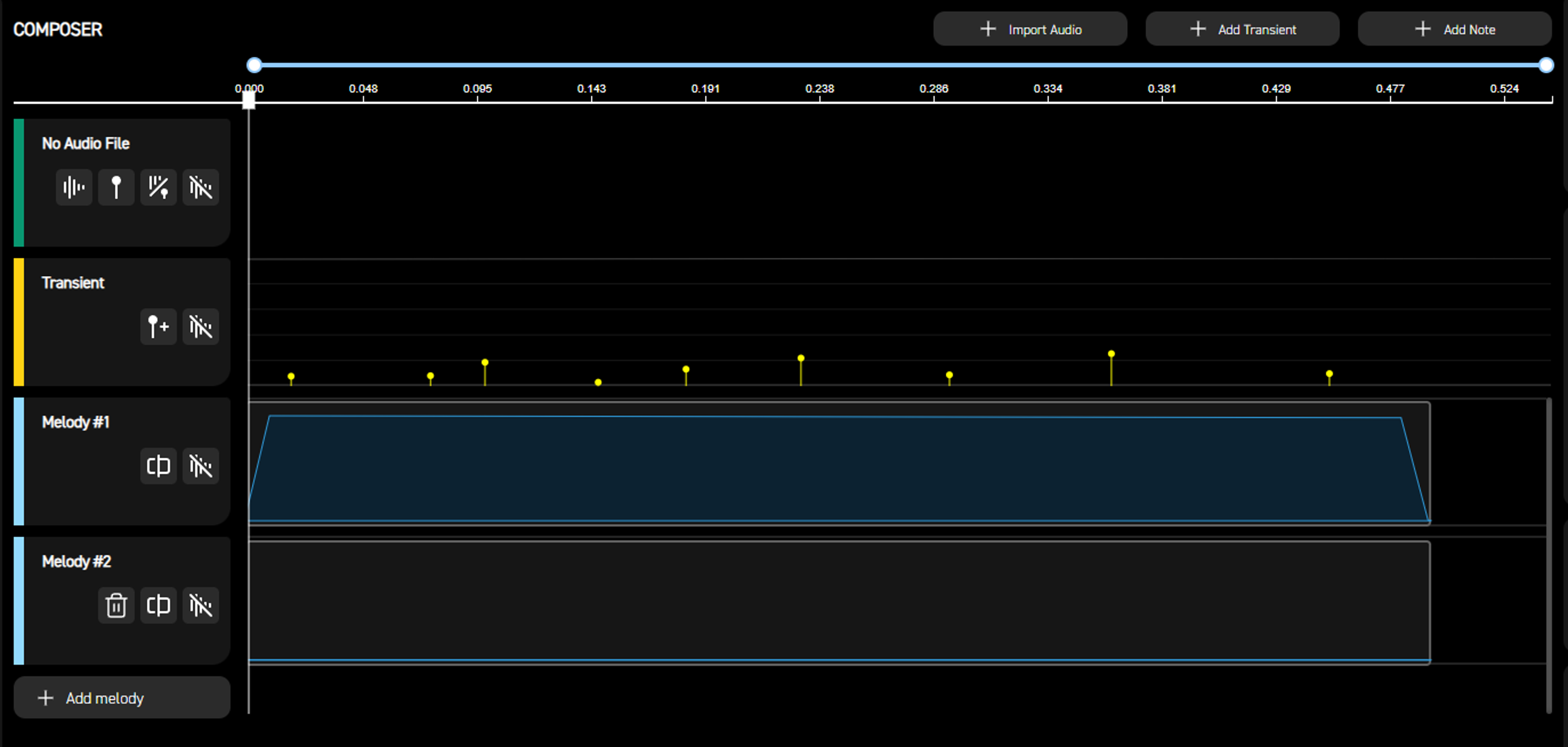
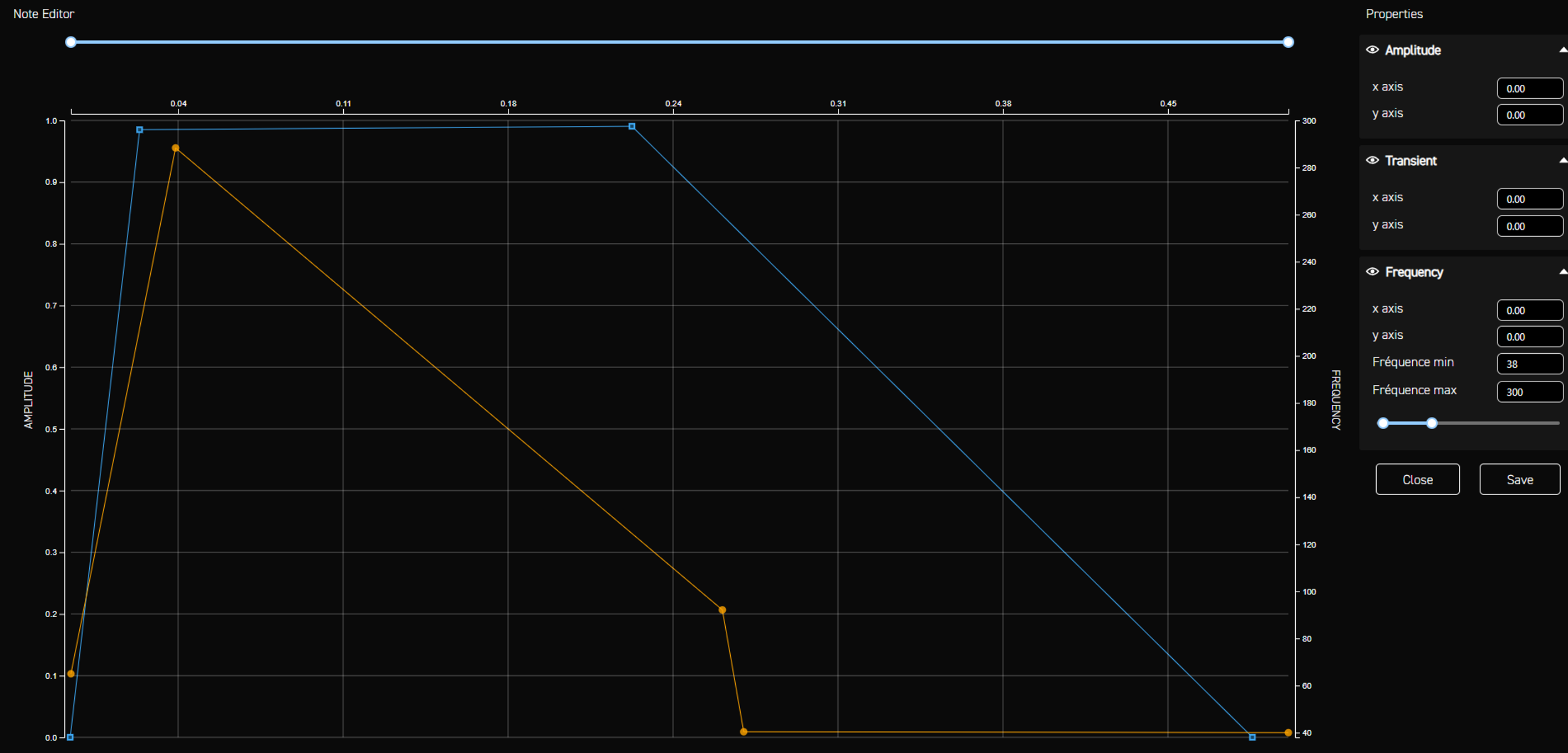
With the frag grenade, we want to simulate an explosion. To achieve this, we’ll use some familiar elements: maximum amplitude and several strong transients to give the effect power and impact. However, there’s also a slightly unusual element—a second melody.
When we look at the two notes that make up the effect and compare them, we can observe a very particular behavior.
When we look at the two notes that make up the effect and compare them, we can observe a very particular behavior.
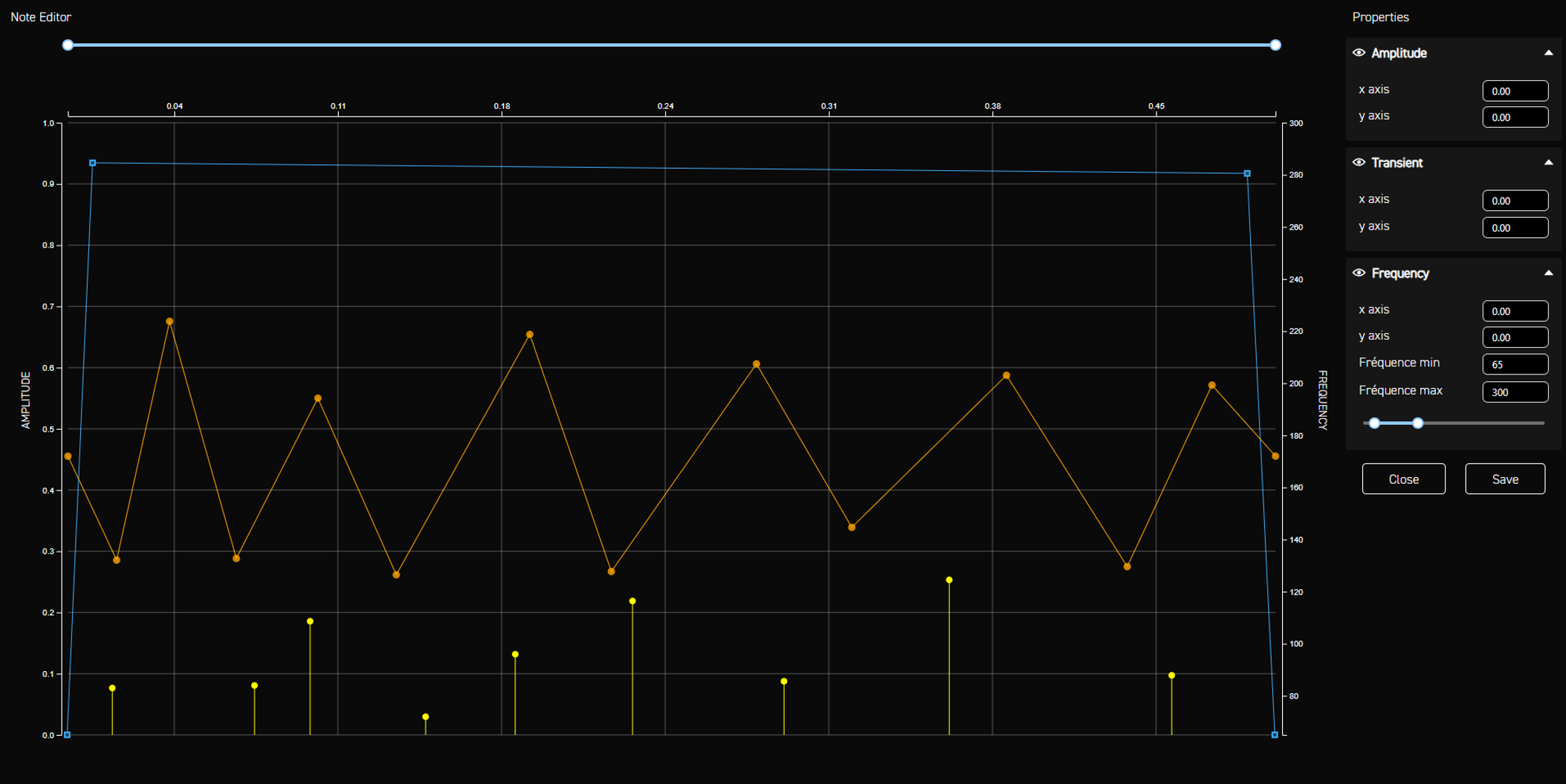
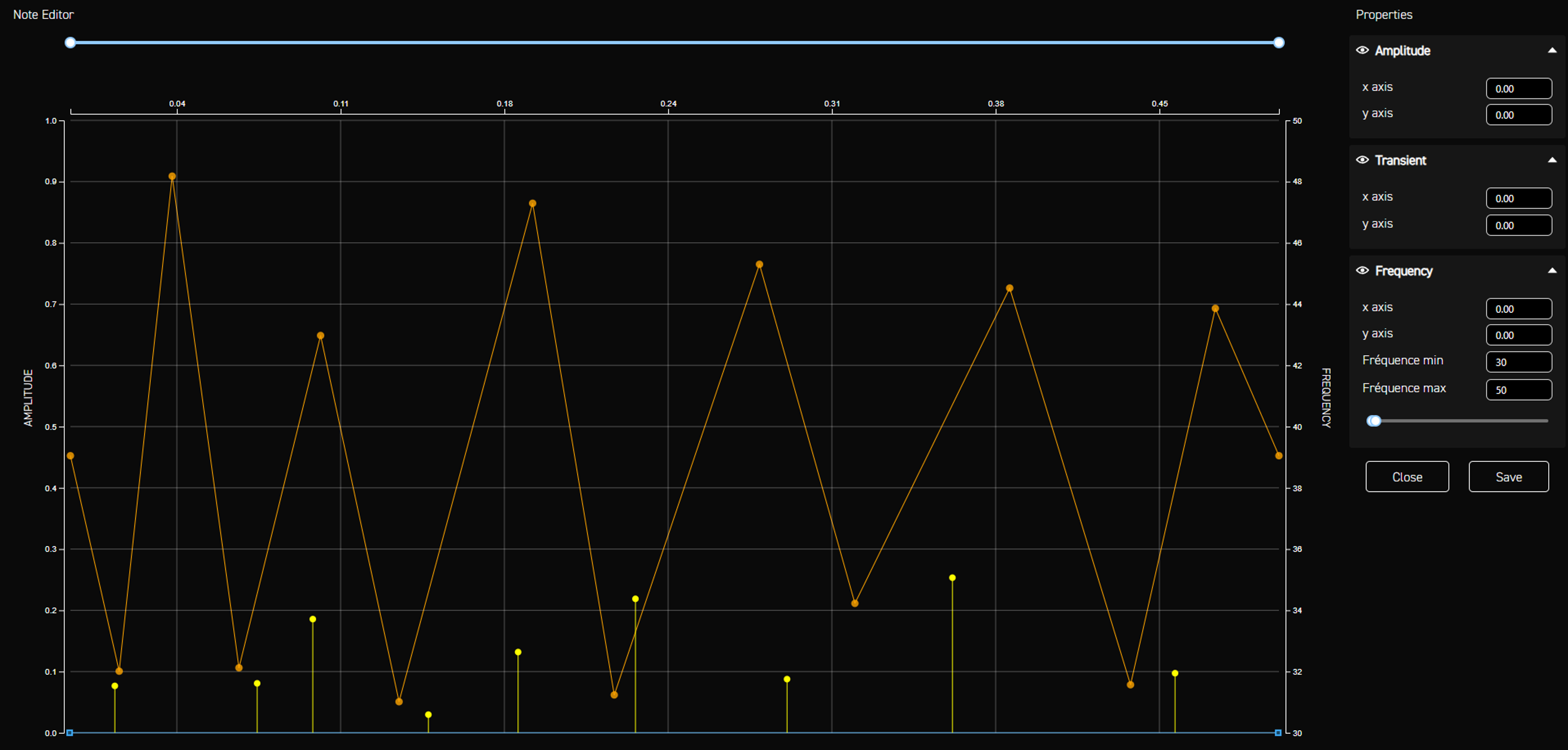
The two notes have drastically different frequencies, yet they are played at the same time. Setting up the effects this way produces a unique sensation: a sudden frequency change creates an additional impact that feels very different from the regular transients. This creates extra chaos, exactly what we want for an explosion.
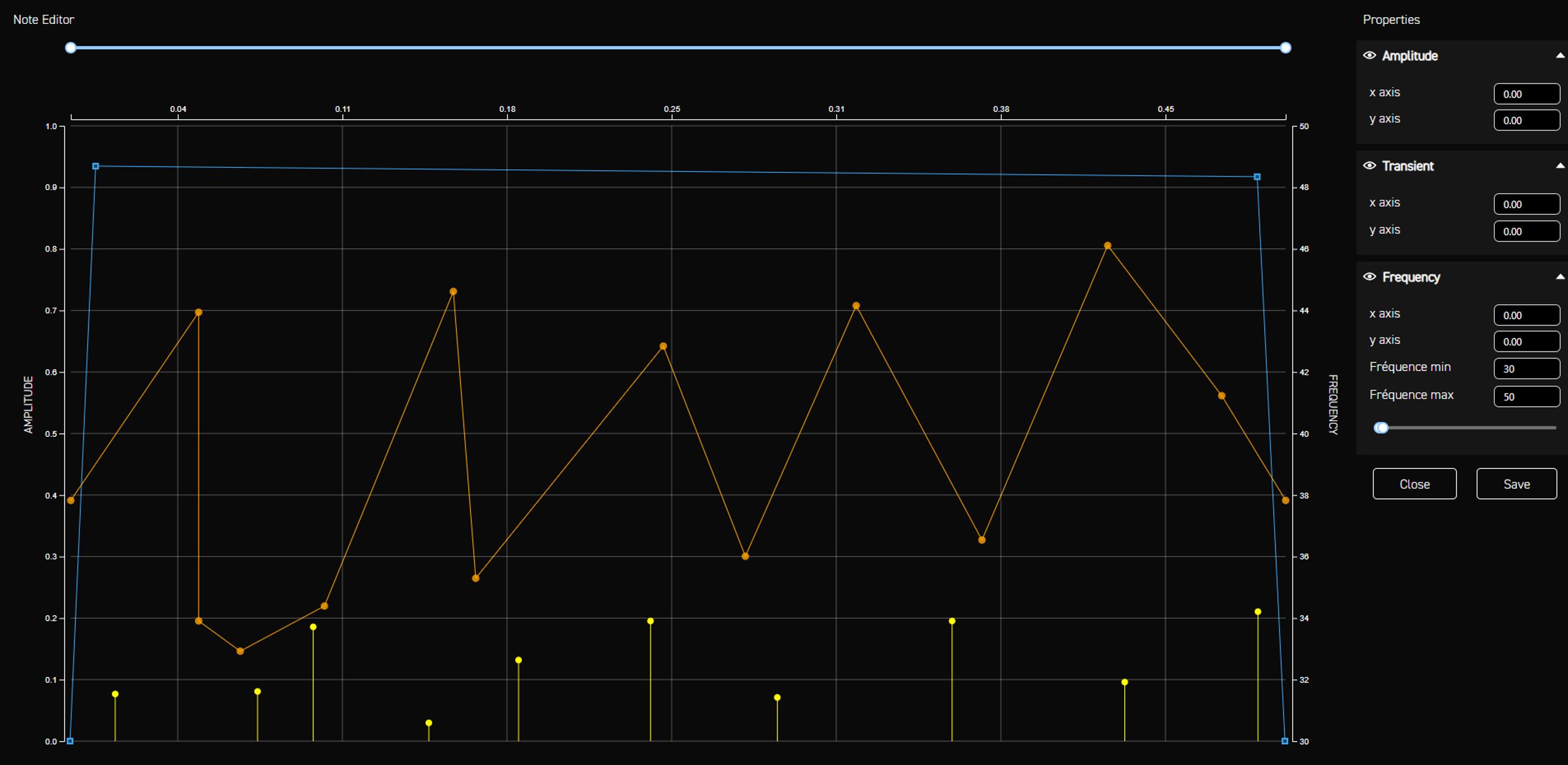
Of course, just like in all previous cases, we create the same effect again but adapted to different frequency ranges for the headset. Otherwise, there is a risk of hearing the vibration. That being said, depending on the design intention, the fact that the vibration is audible could also become a deliberate choice.
Flash Grenade Haptics
For the flash grenade, the intention is to create disorientation. When a flash grenade hits you in the game, the screen becomes white, and you hear a very high-pitched tone that indicates disorientation. It’s not pleasant, but it serves the gameplay. The same principle applies to haptics: we push the frequency to the highest possible range to create that same uncomfortable, high-pitched physical sensation that complements the sound and visuals.
The Power of Frequency
As we’ve seen, frequency plays a major role in haptic design. We use it to create variation, to control intensity, to define realism, and even to reinforce the extravagance or chaos of certain effects.
Frequency is one of the primary tools in designing haptic behaviour, and it allows us to produce hundreds of different sensations. It is an incredible design resource that opens up a vast field of possibilities we have only begun to explore, and we look forward to diving deeper into these behaviours in future games.
To add Chroma and haptic effects to your game, start by getting the Haptics and Chroma tools and follow the WYVRN docs for integration guidance.
Frequency is one of the primary tools in designing haptic behaviour, and it allows us to produce hundreds of different sensations. It is an incredible design resource that opens up a vast field of possibilities we have only begun to explore, and we look forward to diving deeper into these behaviours in future games.
To add Chroma and haptic effects to your game, start by getting the Haptics and Chroma tools and follow the WYVRN docs for integration guidance.
Vasguen Vardanian, Immersive Experience Designer